IntegrationsGuides
Import purchase prices: the basis of meaningful profit analysis
A step-by-step guide
Revenue shows what customers bought. To calculate product profitability, Shopstato also needs purchase prices matched to your products.
What to prepare
A UTF-8 file using semicolons and decimal commas, with columns in this order: product code or name; purchase price excluding VAT; purchase price including VAT; VAT rate.
Step by step
- Prepare the required columns in the specified order.
- Check the separator, encoding, decimal notation and VAT values against the current import form.
- Upload the file in Import purchase prices.
- Check several matched products after processing, then review the profit report.
An example from the application
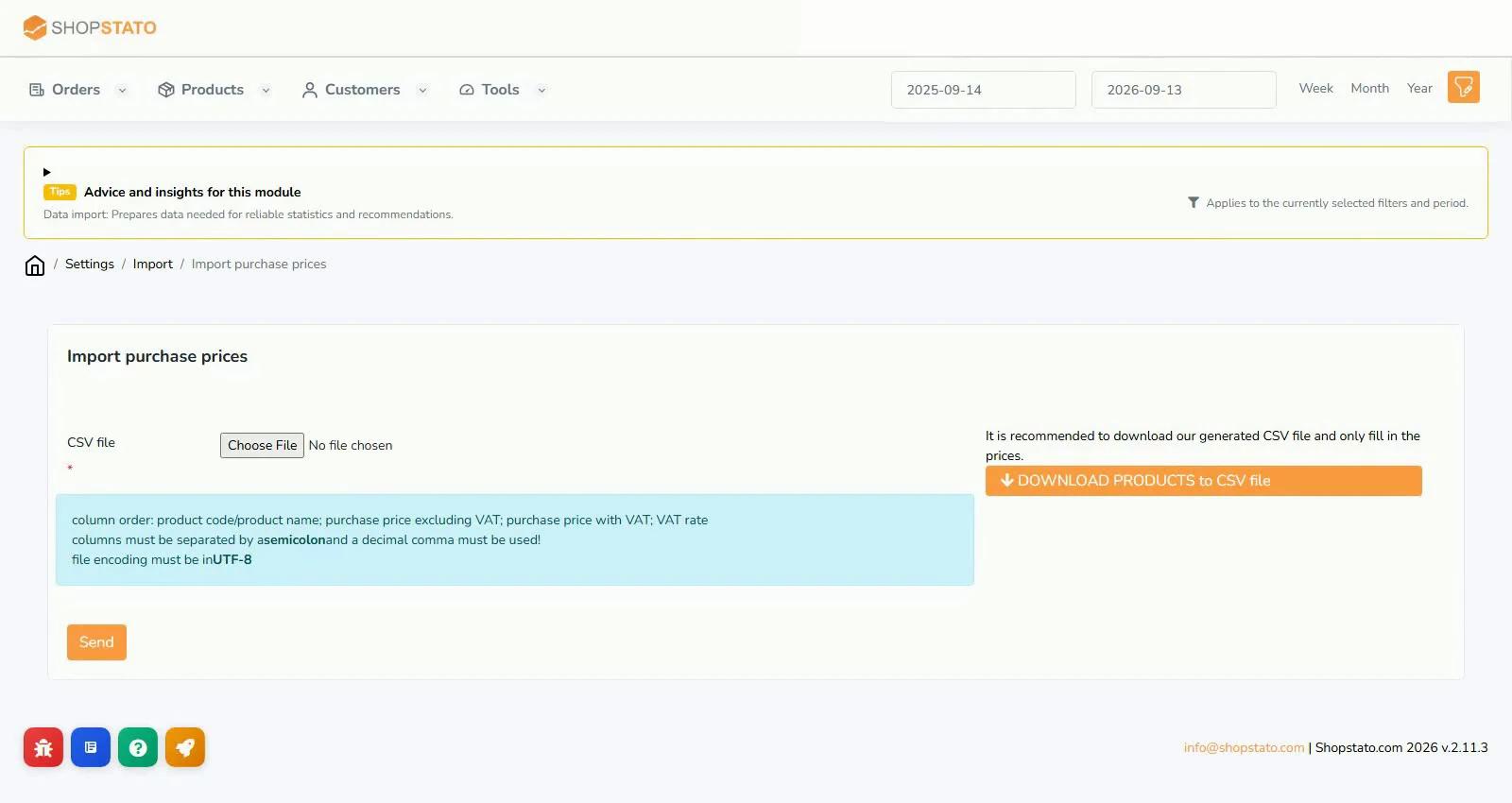 Enlarge screenshot ↗
What to consider when interpreting the result
A plausible total can hide products without purchase prices. Start with high-revenue items and do not treat missing costs as zero.
Continue in the application
Application links require sign-in. Access to a report depends on your permissions and the relevant module.
Source: Shopstato help centre . This English guide adds practical context and examples from English video tutorials.